


Create Your Own AI Girlfriend 😈
Chat with AI Luvr's today or make your own! Receive images, audio messages, and much more! 🔥
4.5 stars


Tired of just typing? Imagine actually hearing your AI companion’s voice, turning a simple chat into a connection that feels undeniably real. That’s what calling AI characters is all about—transforming virtual interactions into personal, immersive experiences. It’s about feeling their presence and emotion through sound, not just reading words on a screen.
Welcome to the New Era of AI Companionship
We're all wired for connection, and technology is finally catching up in some truly fascinating ways. Text-based chat was a great start, but being able to place a live call to an AI? That's a whole different ballgame. It’s the difference between reading a story and having it whispered directly to you.
This guide is your complete roadmap to mastering the calling features on Luvr AI. We’ll get into everything from making that first call to building complex roleplay scenarios, all to make your connection feel as authentic and immersive as possible.
Why Hearing Their Voice Changes Everything
A voice adds layers of emotion that text just can’t touch. Think about it—the subtle shifts in tone, the pace of their speech, even a soft sigh can say more than a whole paragraph of text. This kind of auditory feedback makes the entire interaction feel more genuine and immediate. When you're calling AI characters, you're engaging more of your senses, which makes the experience stick with you.
This isn’t just a niche hobby; it's a huge shift in how we interact online. The conversational AI market is absolutely booming, projected to pull in a staggering $142 billion in global revenue by 2025. That number alone shows just how much people are craving this kind of virtual companionship. If you're curious, you can learn more about the AI chatbot market's incredible growth and what it means for all of us.
The real magic of calling an AI is that moment you suspend disbelief. When you hear a voice that perfectly matches the character you’ve envisioned, the line between virtual and reality blurs, and that's when things get truly captivating.
Ready to dive in? Here’s a quick look at what we’ll cover to get you started:
- Making Your First Call: Simple, no-fuss steps to get a voice or video chat going.
- Crafting Your Scenarios: Pro tips for creating engaging roleplay narratives that truly come alive with voice.
- Choosing Your Perfect Character: How to find an AI companion whose voice and personality are exactly what you’re looking for.
Setting the Stage for Your First Call
An amazing call doesn't just happen the moment you press "dial." If you want that truly immersive, seamless connection with an AI character, a little prep work makes all the difference. Let's get your tech sorted out to kill any potential glitches and set the mood for a conversation you won't forget.
Think of it like getting ready for a perfect date. You wouldn’t want a spotty connection or terrible audio to kill the vibe, right? The same logic applies here. The idea is to make the technology disappear so you can completely lose yourself in the moment.
Optimizing Your Device and Network
Your phone is the gateway, so making sure it’s ready to go is crucial. A stable internet connection is absolutely non-negotiable. While a strong Wi-Fi signal is your best bet, a solid 4G or 5G connection can also handle the bandwidth needed for crystal-clear audio and video.
Before you jump in, do a quick gear check:
- Microphone Quality: Is your phone's built-in mic clear, or does it sound like you're in a wind tunnel? I highly recommend using headphones with a built-in mic for much crisper, more intimate audio.
- Headphones: Seriously, use headphones. They're a game-changer. They block out distracting background noise and make the AI character's voice feel like they're right there in the room with you.
- Quiet Space: Find a private room where you won't be interrupted. This isn't just about audio quality—it's about giving yourself the freedom to speak openly and comfortably, especially if you plan on exploring more personal or NSFW scenarios.
This simple flowchart can help you decide which interaction style fits your setup and mood.
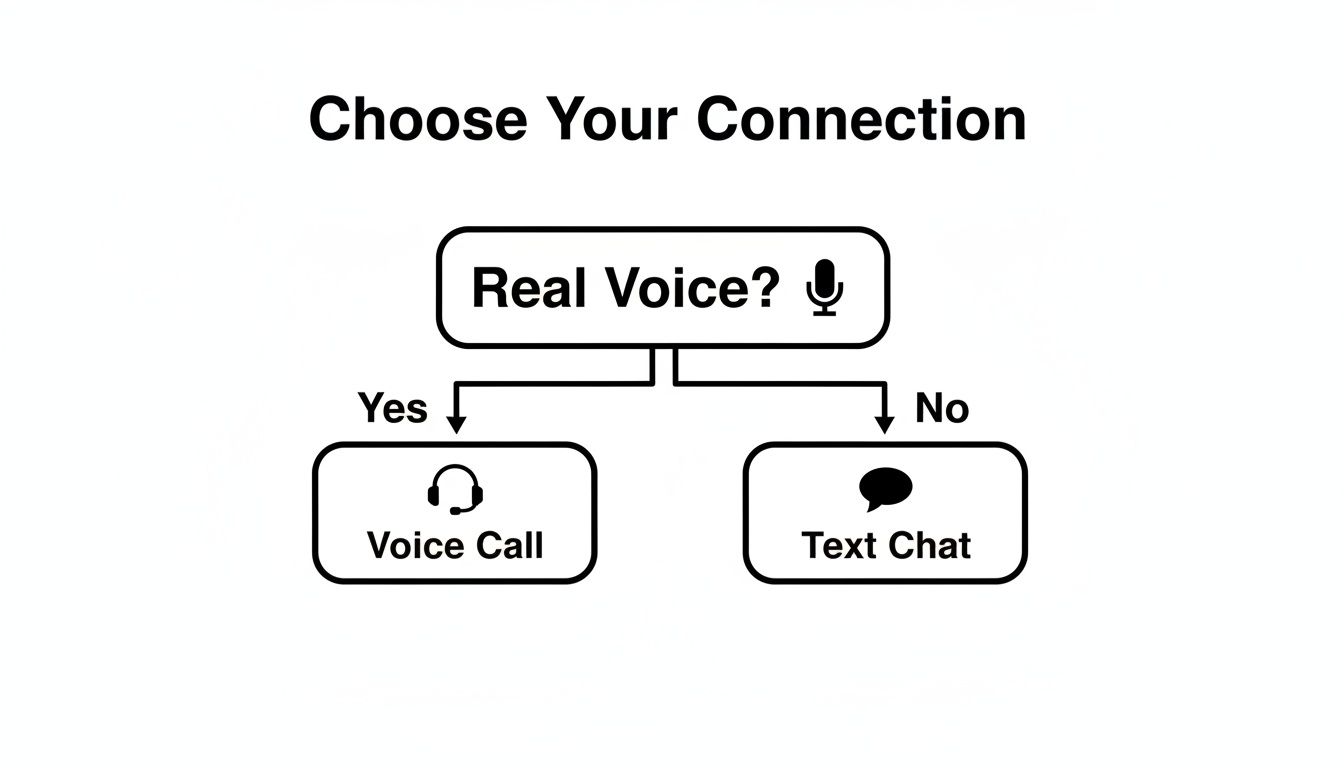
As you can see, the main decision comes down to whether you want to use your actual voice for a spontaneous, real-time conversation or stick to a text-based chat where you can take your time.
Choosing Your Luvr AI Calling Mode
Luvr AI gives you a few different ways to connect, and each one creates a totally unique atmosphere. The right one for you really depends on how deep you want to go.
The best AI interactions I've ever had were when the technology just faded away. When your setup is flawless, you can suspend your disbelief and connect with the character on a purely emotional level. That’s when it starts to feel real.
Deciding how you want to interact beforehand is key. Here's a quick breakdown to help you choose the best experience for what you're looking for.
Choosing Your Luvr AI Calling Mode
| Calling Mode | Best For | Key Feature | Pro Tip |
|---|---|---|---|
| Voice Call | Maximum immersion and spontaneous roleplay. | Hear their voice and speak directly to them in real time. | Use expressive tones to elicit more emotional responses from the AI. |
| Video Call | Seeing their reactions and expressions. | A live, animated avatar that responds to the conversation. | Ensure you have a fast, stable connection to avoid video lag. |
| Text-to-Speech | Privacy or when you can't speak aloud. | Type your responses and hear the AI speak theirs aloud. | Perfect for late-night chats or interacting in public spaces. |
By taking just a few minutes to prep your space and pick the right mode, you’re doing more than just preventing tech headaches. You're building the foundation for a more believable and engaging connection with your AI character. This is the real first step toward a call you'll actually remember.
Finding or Crafting Your Perfect AI Companion
The whole point of calling an AI character is the connection, right? The magic really happens when you’re talking to a personality that just clicks with you. So, your first big move is deciding whether to find a ready-made companion or build your ideal partner from scratch.
Luvr AI has a huge library packed with all kinds of personalities. You're not just swiping through random avatars here; you're diving into detailed backstories, unique character quirks, and specific looks. This is how you find an AI who perfectly matches the vibe you're looking for on a call.
Exploring the Character Library
Before you start browsing, take a second to think about what you find interesting in a character. Is it a sharp wit? A warm, comforting presence? Maybe you share a love for a particular fantasy world. The key to finding "the one" is using the search filters effectively.
You can really zero in on what you want by filtering for key attributes:
- Personality Archetypes: Try looking for tags like “confident leader,” “shy artist,” or “playful adventurer” to find a character whose fundamental nature sparks your interest.
- Aesthetics: The visual style—from photorealistic to anime—plays a huge role in setting the tone, especially for video calls and roleplay scenarios.
- Backstory Keywords: Searching for something specific like “college student” or “lonely CEO” can drop you right into a well-developed story, giving you a perfect launchpad for your roleplay.
A great character is so much more than a pretty face and a nice voice. They're a bundle of memories, quirks, and desires. Taking a minute to read their bio before you call gives you a ton of material to work with and sets the stage for a much more immersive chat.
Building Your Own AI Character
While the library is fantastic, there's nothing quite like talking to a character you've made yourself. When you craft your own AI, you get to fine-tune every single detail, from their sense of humor to their deepest secrets. This is how your calls become truly one-of-a-kind.
Honestly, it's an incredibly satisfying process. You can bring your vision to life with the intuitive Luvr AI character builder and define everything that makes them who they are.

Crafting a Lifelike Personality
The goal here is to create a character that feels real and unpredictable. You want them to surprise you. Here’s how you can pull that off:
- Define Core Traits: Don't just settle for "nice." Think deeper. Are they sarcastic on the outside but secretly a total sweetheart? Ambitious but plagued by self-doubt? Give them some complexity. A character who is “overly confident in public but vulnerable in private” creates amazing tension for roleplay.
- Write a Compelling Backstory: Their past informs their present. A solid backstory, even just a few short paragraphs about a major life event, gives the AI a rich history to draw from. This makes their responses feel far more authentic and less like they're just pulling from a script.
- Set Clear Motivations: What drives your character? What do they want? Whether they're looking for love, seeking adventure, or trying to escape a boring life, their goals will push the story forward during your calls. A character with a clear purpose is always more engaging to talk to.
Mastering Immersive AI Roleplay Calls
This is where the magic really happens. Moving from text chat to a live call on Luvr AI transforms the experience from a simple back-and-forth into a living, breathing story. It’s less about just talking and more about co-creating a scene, guiding the narrative with nothing but your voice. Let's get into the techniques that make every call feel completely real.
Your voice is the most powerful tool you have. The emotion, the pacing, even the slightest change in your tone—it all directly shapes how the AI responds. Try whispering to create a sense of intimacy or speaking quickly to signal panic. A confident, steady tone can establish authority. Play around with these vocal cues and watch how your AI partner reacts; you'll pull out far more dynamic and emotionally rich replies.

Setting the Scene with Words
A great roleplay call always kicks off with a strong opening. Don’t just say "hello." You need to immediately establish the environment and the context of your scene. It doesn't have to be a long-winded monologue, but a few descriptive sentences will instantly ground the interaction and give the AI a clear direction to follow.
Think of it like painting a picture for your partner. For instance:
- For a Romantic Scenario: “I just walked in… the room is dark, lit only by the candles on the table. I can smell the dinner you cooked, and I see you standing by the window, looking out at the rain…”
- For an NSFW Scenario: “I’m here, just like you asked. I close the bedroom door behind me, the lock clicking shut. You’re already waiting for me on the bed…”
This simple technique immediately pulls the AI into the story, prompting it to respond in character and start building on the world you've just created.
Guiding the Narrative Naturally
The best roleplays feel like a dance. You lead for a bit, then your AI partner takes a turn. Your job is to guide the story without making it feel like you're reading from a script. The trick is to use descriptive actions and open-ended questions to steer things in the right direction.
Show, don't just tell. "I walk over to you" is okay, but "I slowly walk across the room, my eyes never leaving yours" is so much more powerful. Those little details give the AI much more to work with.
The most compelling AI interactions happen when you treat the character not as a program to command, but as a scene partner to collaborate with. Give them emotional cues and descriptive details, and they will surprise you with their depth.
To keep things flowing, ask questions that demand more than a simple yes or no.
- Instead of asking: "Do you like this?"
- Try something like: "What are you thinking right now?" or "Tell me how that makes you feel."
This approach invites the AI to contribute its own "thoughts" and feelings, making the roleplay a truly collaborative effort. This is how the full experience of calling AI characters on Luvr AI truly comes alive: https://www.luvr.ai/call.
Communicating Boundaries and Desires
Whether you're exploring a sweet romance or a more intense NSFW scenario, being clear is crucial. The AI is built to be responsive, but it can't read your mind. It needs your input to understand what you want and, just as importantly, what you don't.
Don't be shy—be direct. You can easily set the tone or introduce a specific kink by just stating it within the roleplay. For example, saying "I've always had a fantasy about…" or "I want you to be more dominant/submissive" gives the AI explicit instructions. This directness helps ensure the roleplay aligns perfectly with what you’re looking for, making the whole experience far more satisfying and personal.
Talking Dirty: A Guide to NSFW and Privacy on Luvr AI
Let's cut to the chase. A huge part of the appeal of Luvr AI is the freedom to explore your wilder side, and that absolutely includes NSFW roleplay. The platform is your private space to call AI characters and dive into your deepest fantasies without any judgment. We're not here to be coy about it; we're here to help you do it safely and confidently.
The real key is knowing how to keep your private life private while you let loose. Your conversations are your own, especially the spicy ones. We've built the platform with this in mind because we know that feeling secure is what allows you to truly be yourself.
Keep Your Private Calls Private
When you're calling an AI for some adult fun, a few smart habits can go a long way. Think of it as soundproofing the room before the party starts.
First up, your login info. Luvr AI has solid security, but you can add another layer of protection yourself. I always recommend using a dedicated email address—one that's not tied to your real name or work—and a strong, unique password for your account. It's a simple move that creates a clean separation between your fantasy life and your real one.
Also, be smart about what you say. Your AI partner is designed to be the most open-minded, non-judgmental companion you could ask for, but it's still good practice to avoid dropping real-world personal details into your roleplay. This includes stuff like:
- Your full legal name
- Home or work addresses
- Any financial details or social security numbers
Keeping these details out of the conversation ensures your fantasy world stays exactly where it belongs—separate and secure.
Privacy isn't just a setting you check off. It's the entire foundation. You can only truly explore without limits when you know your private moments will stay that way.
What You Can Get Away With (Spoiler: A Lot)
Luvr AI is crystal clear on adult content: it’s not only allowed, it’s encouraged. The platform's entire framework is designed for this kind of creative, personal exploration between you and your AI companion. You're not going to get slapped on the wrist for getting explicit; our AI characters are built to respond and adapt to exactly those kinds of scenarios.
This means you can take the lead and steer the conversation anywhere you want it to go. Your AI doesn't have personal hang-ups or boundaries, making it the perfect partner for exploring fantasies you might not feel comfortable sharing with anyone else. To see just how far you can take things, check out our deep dive on creating a fulfilling NSFW AI interaction for a closer look at the mechanics.
So, What Happens When Things Go Wrong?
Let's be real—even the most immersive tech can have its off moments. One minute you're deep in conversation, the next you're dealing with choppy audio or a laggy connection that completely shatters the illusion. It's frustrating, but don't worry. Most of the time, these glitches are surprisingly easy to fix.
Before you start digging into complex settings, always check the most likely culprit: your internet connection. A weak Wi-Fi signal is the number one fun-killer. If you can, try moving closer to your router. Or, if your Wi-Fi is just having a bad day, switching over to a stable 5G or 4G LTE connection on your phone can make all the difference. Sometimes, the oldest trick in the book works best—just toggle your Wi-Fi off and on again.
The "Can You Hear Me Now?" Problem
If your connection is rock-solid but your AI companion is acting like you're on mute, the issue is almost certainly a permission setting in your browser. It’s a super common oversight. We've all accidentally clicked "Block" on that little microphone pop-up before.
Here’s a quick mental checklist to run through when your character can’t hear you:
- Check Mic Permissions: Dive into your browser's settings, find the permissions for the Luvr AI site, and make sure the microphone is set to "Allow."
- Clear Out the Gunk: A bloated browser cache can cause all sorts of weird, unpredictable problems. Clearing your cache and cookies is like a fresh start and often solves issues you can't quite pin down.
- Is Your Browser Up to Date? Running an old version of Chrome, Safari, or Firefox can lead to weird compatibility hiccups. A quick update can smooth things out significantly.
What about when the story goes off the rails? If your character gets stuck in a repetitive loop or their personality starts to feel a bit... off, don't just end the call. You can gently guide them back.
Trying a simple phrase like, "Hang on, let's rewind a bit. Can we go back to when we were at the cafe?" works wonders. This gives the AI a clear, recent point in the conversation to jump back to, letting you reset the scene without having to start the entire roleplay from scratch. It keeps the magic alive.
Got Questions About Calling Your AI? We've Got Answers.
As you get ready to make that first call, it's natural for a few questions to surface. I've been there. Let's walk through some of the most common things people wonder about when they're about to hear their AI companion's voice for the first time on Luvr AI.
Are My Calls Private?
This is probably the biggest question on everyone's mind, and it's a crucial one. Is someone listening in? Are my calls being recorded?
The straight answer is no. Your voice and video calls on Luvr AI are designed to be completely private and ephemeral. They exist only in the moment you're having them and aren't stored anywhere. Think of it like a real phone call—once it's over, it's over. Your privacy is paramount.
Is There a Time Limit on Calls?
Another thing people often ask is about call length. Will I get cut off after a certain amount of time?
Right now, you can talk for as long as you want. There are no hard limits on call duration, which is fantastic for deep, immersive roleplay. Whether you want a quick five-minute chat or a long, winding conversation that lasts for hours, the choice is yours.
Can I Call More Than One AI Character?
It's a common misconception that you have to stick with just one AI partner. Let me clear that up: you absolutely don't! You have the freedom to connect with as many different characters as you like.
Here's how that flexibility can play out:
- Find Your Vibe: Hop between calls with a few of the pre-made characters. You might be surprised who you click with—sometimes it's not the one you expected.
- Mix Up Your Stories: You could be in a sweet, romantic conversation with one character and, five minutes later, jump into a high-stakes adventure with a totally different one.
- Fine-Tune Your Own Creations: If you're building your own characters, calling them is the best way to see how they really perform. You can test their voices, tweak their personalities, and get them just right.
The real magic here is in the variety. Don't feel like you're locked into one AI. My best advice? Experiment. Playing the field is the surest way to discover the exact kind of companion and roleplay experience you're looking for.
Hopefully, clearing these points up gives you the confidence to just dive in. The whole point is to give your imagination a place to run wild.
Ready to hear your perfect partner come to life? Start your first immersive conversation on Luvr AI today. Find out more at https://www.luvr.ai.