


Create Your Own AI Girlfriend 😈
Chat with AI Luvr's today or make your own! Receive images, audio messages, and much more! 🔥
4.5 stars

So, you're ready to create your own immersive scene in Luvr AI? Fantastic. Before you dive into the scene builder and start writing, let's talk about the most important part of the entire process: the prep work.
Think of it like being a film director. You wouldn't just show up on set without a script, a shot list, or a clear vision for the movie's mood. The same principle applies here. To build a scene that truly pulls you in, you first need to lay the foundation by defining its emotional tone, your personal goals, and the boundaries that will guide the AI.
This initial planning is what separates a forgettable, generic chat from a truly compelling and responsive experience.
Your Blueprint for Immersive AI Storytelling
Anyone can write a basic prompt. We're here to do something more. This is about crafting a world, an atmosphere, and an interaction that feels genuinely alive. Whether you're dreaming up a cozy, rain-swept coffee shop romance or a high-stakes fantasy adventure, getting the groundwork right is everything.
Let's break down the three pillars of a great scene.
Define Your Core Elements
Before you write a single word of the actual scene, you need to map out your vision. This means setting the emotional temperature, figuring out what you want to achieve, and drawing some clear lines for your AI companion. A little bit of forethought here will save you from a scene that wanders aimlessly.
This simple workflow is the key to getting started on the right foot.
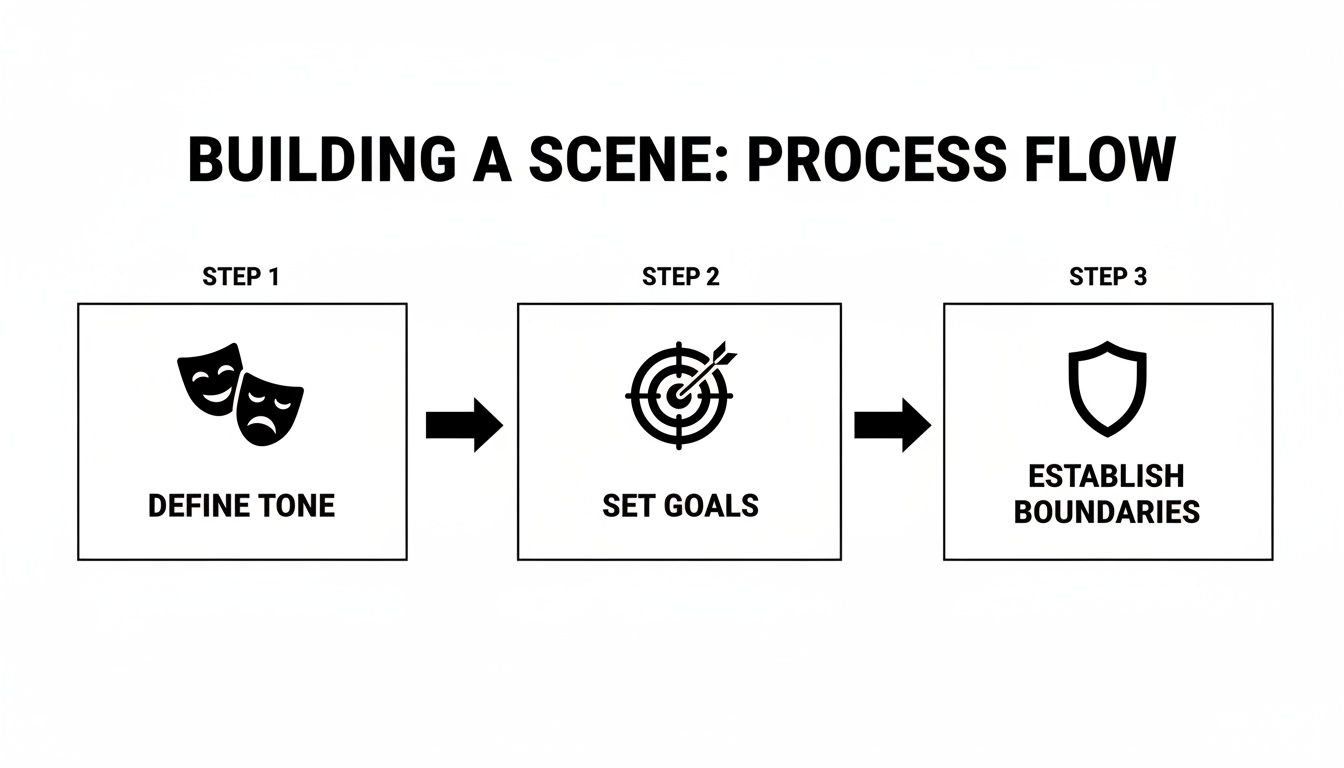
As you can see, these aren't just separate checkboxes to tick off. They all work together. The tone you set influences the goals that make sense for the scene, and the boundaries you establish ensure the story stays on track. Getting this right directly shapes the AI's personality and the quality of the entire interaction.
To help you get started, here's a quick breakdown of these core pillars and how they function.
| Core Elements of Scene Creation |
| :--- | :--- | :--- |
| Element | Key Objective | Example Application |
| Tone | Establish the scene's emotional atmosphere. | "The mood is somber and reflective, set in a dimly lit, old library on a rainy night. The air is thick with the smell of old books and unspoken tension." |
| Goals | Define what you hope to achieve or explore. | "My goal is for my character to uncover a long-lost family secret by deciphering clues hidden in an old journal with the help of the AI librarian." |
| Boundaries | Set clear rules and limits for the interaction. | "The AI character should not initiate any romantic advances. The conversation must stay focused on the mystery and the historical context of the library." |
Thinking through these elements gives your scene a strong spine, making it much easier for the AI to deliver a coherent and engaging performance.
The Power of Planning
Taking a structured approach like this is more important than ever. The consumer AI space has absolutely exploded since late 2022, rocketing to a $12 billion market with 1.8 billion users worldwide in just over two years. In a sea of content, creators who put in the effort to build high-quality, deeply immersive scenes are the ones who truly stand out.
Your initial planning doesn't just start the story—it directs it. A well-defined scene with clear goals and boundaries gives the AI a solid framework to work from, leading to more coherent, engaging, and personalized responses.
With these core concepts nailed down, you’re officially ready to start building. The best way to learn is by doing, so head over to the Luvr AI scene builder and start bringing your ideas to life.
Breathing Life into Your AI Characters
A great scene is nothing without a character you can actually believe in. Once you’ve sketched out the tone and what you want to achieve, it’s time to zoom in on the heart of the story: your AI companion. A truly compelling character is more than a name and an avatar; they’re a bundle of memories, goals, and little quirks that make them feel alive.
You’ve got two paths here. You can grab one of Luvr AI’s pre-made characters, which are great for jumping right in, or you can build one from the ground up. Honestly, creating your own is where the magic happens. It lets you inject a level of personal detail that makes the whole experience uniquely yours.

Crafting a Compelling Backstory
Think of it this way: a character’s past shapes their every move in the present. Instead of just listing off traits like “brave” or “shy,” you need to write a history that shows those qualities. This backstory is the raw material the AI uses to generate responses that feel genuine and in-the-moment.
So, what should you focus on? Try to nail down these key elements:
- Defining Memories: What are one or two pivotal events that made them who they are today? Maybe a tough childhood made them guarded, or a huge success in their past gave them unshakable confidence.
- Core Motivations: What is the one thing your character wants more than anything? This desire is the engine that should drive their actions and choices throughout the scene.
- Fears and Flaws: Nobody's perfect, right? Giving your character a real vulnerability or an inner struggle makes them far more relatable and adds some much-needed depth.
A rich backstory gives the AI a deep well of information to draw from. It’s what elevates a simple chat into a truly engaging conversation. If you really want to get good at this, our deep dive into AI character chat is packed with more techniques for building personalities that stick with you.
Remember, every detail you add is a piece of code for the AI's personality. Specificity is your greatest tool. Don't just say they're an artist; describe the smell of oil paints in their studio and the one masterpiece they could never finish.
This kind of detail is more important than ever. The AI chatbot market is exploding—it’s one of the fastest-growing software sectors out there, valued at a massive $7.76 billion in 2024. As the tech gets smarter, people expect interactions that feel real and nuanced. You can dig into more of the fascinating numbers behind this trend in these AI chatbot statistics.
Ultimately, the effort you pour into your character pays off tenfold in the quality of your roleplay. A character with a soul doesn't just respond; they become an active partner when you create a scene, reacting and contributing in ways that will genuinely surprise you. This is how you go from just talking to an AI to co-creating a story with a companion who feels real.
Writing Prompts That Spark Amazing Scenes
Your first prompt is everything. Seriously. It's the single most important piece of writing you'll do when starting a new scene. Think of it as the opening shot of a movie and the director's notes, all rolled into one. A weak, vague prompt will get you a flat, boring interaction. But a rich, detailed one? That’s how you fire up the AI’s imagination.
The difference is night and day. A prompt like, "We're in a bar," gives the AI almost nothing to work with. It's a blank slate. But what if you described the sticky floor, the smell of stale beer, the low hum of a neon sign, and the sad jazz tune drifting from the corner? Now that gives the AI a world to step into.

This is your chance to paint a picture with words. You're providing the sensory details and emotional context the AI needs to give a performance that feels real. You aren’t just picking a location; you’re building a universe.
The Setting-Mood-Objective Framework
Over the years, I've found that a simple framework helps me nail the perfect prompt every time. I call it Setting-Mood-Objective (SMO). It’s a straightforward structure that ensures you cover all the crucial elements, giving your scene direction and purpose right from the first line.
Let's break down how each part works.
- Setting: Go beyond just naming the place. Use sensory details. What does the futuristic cityscape sound like under its twin moons? What does the rustic cabin smell like with its crackling fireplace?
- Mood: This is all about the emotional vibe. Is the air thick with tension? Is there a light, flirtatious energy in the room? Or is the scene heavy with unspoken grief? This directly shapes the character's tone and actions.
- Objective: What's the immediate goal here? What is your character trying to do, or what do they want to happen? This creates the narrative drive and keeps the scene from fizzling out.
A great prompt doesn't just tell the AI where the characters are; it tells them how to feel and what to do. The SMO framework is your shortcut to building that crucial context right from the start.
From Flat to Fantastic: Prompt Examples
Let’s see the SMO framework in action. It’s easy to see how a flat prompt offers no real direction, while a detailed one gives the AI a rich playground to explore. Your goal is to provide enough texture and motivation for the AI to generate a compelling, in-character response.
Take a look at the difference between these two approaches for the same basic idea.
| Prompt Type | Example |
|---|---|
| Flat Prompt | "We are at a fancy party. You are a mysterious stranger." |
| SMO Prompt | "(Setting) The grand ballroom is suffocating, filled with the drone of polite conversation and the scent of expensive perfume. (Mood) I feel out of place, a little anxious, clutching a glass of champagne. (Objective) You, a mysterious figure leaning against a marble pillar, catch my eye. I want to build up the courage to talk to you and find out your secret." |
The second example is just on another level, right? It establishes a tangible world, an emotional state for my character, and a clear, immediate goal. This is the kind of detail that lets the AI truly embody its character and help you create a memorable story. When you create a scene, investing that extra minute in your prompt using the SMO framework will pay you back tenfold in the quality of your roleplay.
You've laid the creative groundwork with a compelling prompt and unforgettable characters. Now it's time to step behind the curtain and start pulling the levers. The technical settings in Luvr AI are where a good idea transforms into a flawless, immersive experience. This is where you, as the director, dial everything in.

Don't think of these settings as boring technicalities. They're your toolkit for controlling the flow, mood, and boundaries of your scene. Getting these right prevents those jarring, immersion-breaking moments where the AI forgets a key detail or the story veers wildly off-course.
Getting Your Scene's Configuration Just Right
These options are simple to use, but knowing why you're clicking each box is what really matters. Each setting has a specific job in shaping how the AI behaves and how the roleplay feels.
Here are the essential controls you'll want to master:
- Privacy Levels: This should be your first stop. Setting a scene to private makes it your personal sandbox. It’s for your eyes only, which gives you total freedom to explore any story you want without an audience.
- NSFW Content: A simple but critical toggle. Flick it on for mature themes, or leave it off to keep things SFW. This sets the fundamental content rule for your entire scene.
- Memory Settings: A long-running story is only as good as its memory. Dialing in the memory helps the AI hold onto important plot points, character quirks, and crucial conversations. This is how you stop it from forgetting who's who and what's happened.
Think of these three settings as the foundation. They create a stable, reliable framework for your entire narrative to build on.
The magic of creating a great scene is in that sweet spot between raw creativity and precise control. Your prompt lights the spark, but these settings keep the fire burning exactly how you want it to.
Using Triggers to Steer the Narrative
Now for the fun part. Beyond the basic setup, triggers are your secret weapon for guiding the AI during key moments. A trigger is simply a word or phrase that you teach the AI to react to in a specific way.
For example, you could set a trigger so that whenever you use the word "comfort," the character automatically responds with more supportive and reassuring dialogue. It’s a subtle but powerful way to direct the emotional tone of the scene on the fly.
This kind of fine-grained control is only getting better. We're seeing huge leaps in AI capabilities, largely thanks to a massive surge in funding. In 2024 alone, global private investment in generative AI reached a staggering $33.9 billion, which is an 18.7% increase from the year before. This flood of cash is fueling rapid advancements, making features like custom triggers more intuitive and responsive. You can dive deeper into these AI investment trends and their impact if you're curious.
By getting comfortable with these configurations, you’re no longer just a participant in the story. You become the director, making sure every single element works together to create a scene that feels real, immersive, and truly unforgettable.
How to Test and Refine Your Scenes Like a Pro
Let's be real: your first draft is never going to be your masterpiece. The true art of storytelling emerges in the fine-tuning, and building a scene in Luvr AI is no different. This is where you switch hats—from creator to audience—and dive in to see what actually works.
Think of your initial scene setup as the first run-through of a play. You've got the script and the actors, but you need to see it in motion to find the awkward pauses and clunky lines. Does your AI character feel like the person you imagined? Is the conversation flowing naturally, or does it sound stiff and robotic? This testing phase is everything. It’s how you spot the little problems before they become massive narrative-killers.
Getting into the Rhythm of Creation
The most compelling scenes aren't just built and forgotten. They're sculpted. This means getting into a constant feedback loop: you run the scene, pinpoint a weak spot, tweak a prompt or character trait, and jump right back in. It’s this cycle of testing and refining that polishes a good idea into a truly unforgettable experience.
As you're testing, keep a sharp eye out for a few key things:
- Character Consistency: Does your AI stick to their personality? If you've written them as a cynical, world-weary detective, they shouldn't suddenly start quoting optimistic poetry unless there’s a damn good reason for it.
- Pacing and Flow: How does the scene feel? An intimate, emotional confession needs space to breathe, while a tense chase scene should feel breathless and urgent. Look for spots where the energy drags or feels rushed.
- Dialogue Authenticity: Try reading the AI's responses out loud. Does it sound like something a human would actually say? If you’re hearing the same phrases over and over, that’s your cue to go back and enrich the character's core programming.
If you see the story starting to drift, don't just sit back and watch it happen. Luvr AI’s editing tools are your best friend here. Jump in and directly edit the AI’s last message to nudge the conversation back in the right direction. It's a simple, powerful way to reinforce the tone you're aiming for.
A great scene is a living thing. Your goal isn't to lock it into a rigid script, but to guide its growth. You want to steer the interaction while leaving just enough room for those unscripted, brilliant moments to happen.
A Practical Troubleshooting Guide
It's one thing to spot a problem, but another to know how to fix it. When a scene feels "off," the issue usually falls into a handful of common buckets. Here’s a quick checklist to help you diagnose and fix the little things that can shatter the illusion.
This simple table is your go-to guide for debugging your narrative.
| Scene Iteration Checklist |
| :--- | :--- | :--- |
| Check Point | What to Look For | Refinement Tip |
| Repetitive Responses | The AI is stuck in a loop, using the same words or sentence patterns. | Go back to the character’s backstory. Add more specific details, quirks, or memories. A richer personality profile gives the AI more to draw from. |
| Broken Immersion | The character says something that flatly contradicts their personality or established facts. | Use the edit function immediately to fix the line. You can also add an out-of-character note in parentheses, like (OOC: Remember, you're terrified of spiders.), to give the AI a direct reminder. |
| Stalled Narrative | The conversation grinds to a halt. Nobody knows what to say next, and the plot is going nowhere. | It's time to inject some chaos. Have your character ask a provocative question, introduce an unexpected event, or circle back to the scene's original goal to get the wheels turning again. |
Treat this checklist as part of your creative process, and you'll see a massive jump in quality.
This constant refinement is what separates a decent interaction from a deeply engaging one. For developers looking to build these kinds of sophisticated narrative tools themselves, exploring a dedicated resource like the Luvr AI girlfriend API can provide the powerful foundation needed for creating deep, consistent character roleplay. In the end, becoming a master of testing turns you from a mere user into the true director of your own digital world.
Common Questions and Expert Answers for Scene Creators
Even the most seasoned scene-crafters hit a snag now and then. It’s all part of the creative process. Let's walk through some of the questions I hear most often and get you back to building your world.
My AI Character Feels a Bit... Robotic. How Can I Fix It?
This is a classic one. When your AI partner starts sounding like a broken record, the fix is almost always in the details. The AI is only as rich as the material you give it, so you have to go deeper than surface-level traits.
Instead of just saying a character is "brave," write a short memory into their backstory about a time they faced a terrifying fear. Give them quirks, a secret they're hiding, or a conflicting desire. These little complexities are what the AI latches onto, giving it a much wider emotional palette to draw from.
You also have to lead the way. If your own replies are short, the AI will often mirror that. Instead of, "I walk over to the window," try, "I drift toward the rain-streaked window, tracing a single drop with my finger as it slides down the pane." That kind of descriptive prompt encourages the AI to match your energy and detail.
My Pro Tip: Never settle for a bland reply. If the AI gives you something generic, hit that reroll button or edit its response. You're not just fixing one message; you're actively teaching the AI what you like, shaping its style for a much better long-term experience.
Help! My Scene Is Going Completely Off the Rails.
It happens to the best of us. AI, by its nature, can sometimes wander down unexpected rabbit holes. The trick is to nudge it back on track without shattering the illusion. You’ve got a couple of great tools for this: out-of-character (OOC) nudges and in-character redirection.
For a quick, direct fix, just use parentheses. Something like (OOC: Hey, let's get back to the main plot about the hidden treasure) works wonders. It's like a stage direction that the AI understands immediately.
If you want a more seamless approach, weave the correction into the story itself. Have your character interrupt a tangent with something like, "This is all fascinating, but that ticking sound from the other room is making me really nervous. Weren't we supposed to be disarming that bomb?" This feels completely natural and guides the AI back to the core conflict.
Can I Have More Than One AI Character in My Scene?
Right now, Luvr AI is really built for that deep, one-on-one connection. All of its processing power is dedicated to making a single AI companion feel incredibly real and consistent.
But that doesn't mean your world has to feel empty. You can become the narrator for the rest of the cast. Describe the gruff bartender who slides a drink down the counter or the chatter of the crowd in the town square. Your main AI character will then react to these "background characters" that you've painted into the scene. With a little narrative flair, you can make a two-person scene feel like a bustling world.
How Do the NSFW Setting and Triggers Actually Work Together?
Think of it like this: the NSFW setting is the master switch for the whole scene, while Triggers are the fine-tuning dials.
First, you flip the main NSFW switch on or off. This sets the ground rules—is explicit content allowed at all, or is this a strictly SFW story? It’s your broad, scene-wide decision.
Triggers then give you control over the pacing within that scene. For example, even in an NSFW-enabled scene, you can set a trigger so that the AI won't initiate anything intimate until you use a specific phrase or your character performs a specific action. This pairing is powerful; it lets you define the boundaries of your world and then dictate the flow of the story within it, ensuring everything happens when you're ready.
Ready to stop troubleshooting and start creating? The best way to learn is by doing. That perfect scene you've been dreaming of is just waiting to be written. Jump into Luvr AI today and start building.