


Create Your Own AI Girlfriend 😈
Chat with AI Luvr's today or make your own! Receive images, audio messages, and much more! 🔥
4.5 stars


At its core, an AI girlfriend API is a toolkit for developers. It gives you direct access to the complex programming needed to build and integrate interactive, AI-powered virtual companions into your own applications, websites, or platforms.
Think of it as the engine for your creation. The API provides all the crucial functionality—like natural language conversation, deep persona customization, and long-term memory—so you can focus on building a unique user experience, whether that’s a simple chatbot or a fully immersive virtual relationship.
Why Use an AI Girlfriend API?

As digital companionship evolves, the demand for truly personal and responsive AI has exploded. An API is the foundational layer that meets this need head-on, handing developers the building blocks to create something truly engaging without starting from zero.
Building advanced conversational AI models from scratch is a massive undertaking. It demands enormous datasets, specialized expertise, and a ton of computing power. An API abstracts all that complexity away, offering a ready-to-go solution that you can plug right into your project.
Diving Into the Core Features
The real advantage of using an API like this is speed and focus. You get to concentrate on what makes your application special while the API handles the heavy lifting of AI processing and conversation logic. This is a booming market, too. The global AI Girlfriend App market was valued at an impressive USD 2.57 billion in 2024 and is on track to reach USD 11.06 billion by 2032.
That staggering growth, which you can read more about in market reports from firms like SNS Insider, shows just how much appetite there is for virtual companionship.
To get you started, let's break down some of the fundamental features you'll find in a robust AI girlfriend API.
Core AI Girlfriend API Functionality at a Glance
This table gives you a quick snapshot of the essential features and what they're used for. Understanding these core components is the first step to building a compelling experience.
| Feature | Description | Primary Use Case |
|---|---|---|
| Natural Language Processing (NLP) | Powers realistic, human-like text and voice conversations. | Enabling users to chat naturally with the AI companion. |
| Persona Customization | Allows developers to define the AI's personality, backstory, and traits. | Creating unique, believable, and consistent characters. |
| Memory & Context | Enables the AI to remember past conversations and user preferences. | Building a sense of history and continuity in the relationship. |
| Multimedia Support | Facilitates sending and receiving images, voice notes, and other media. | Creating a richer, more immersive and interactive user experience. |
| Webhooks & Events | Sends real-time notifications to your application for specific AI actions. | Triggering in-app events, like sending a notification when the AI messages. |
Each of these features is a building block. By combining them, you can move from a simple chatbot to a deeply engaging and dynamic virtual companion.
This guide is your complete technical reference for putting these tools to work. We'll walk through everything you need to know, covering:
- Authentication: Getting your application securely connected to the API.
- Endpoints: A deep dive into the specific URLs for each function.
- Persona Crafting: Best practices for creating AI personalities that feel real.
- Memory Management: How to give your AI a persistent memory for more meaningful interactions.
By the time you're done here, you'll have a solid grasp of how to use an AI girlfriend API to bring your vision to life. Let's get started.
How to Authenticate and Secure Your API Access
Getting your application hooked up to the AI girlfriend API is your first real step, and doing it securely is non-negotiable. This is all handled through authentication—basically, proving your app has permission to make requests. Without it, the server has no idea who you are and will slam the door shut.
The most straightforward way to handle this is with an API key. Think of it as a unique, secret password just for your application. You'll generate this key from your developer dashboard right after signing up. It's on you to guard it carefully.
Generating and Storing Your API Key
Let's get one thing straight: never, ever hardcode your API key directly into your app's source code. If you expose it in your frontend JavaScript or, even worse, commit it to a public GitHub repo, you're handing over the keys to the kingdom. Anyone could hijack your key, run up your bill, and cause all sorts of chaos.
The industry standard is to use environment variables. This technique keeps your secret keys completely separate from your codebase. Your application simply reads the key from its environment at runtime, keeping it safe and sound.
- Generation: First, log into your API provider’s dashboard. You'll find an "API Keys" or "Credentials" section where you can generate a new key.
- Storage: In your project's main folder, create a file named
.env. Inside, add your key like this:AI_GIRLFRIEND_API_KEY="your_unique_api_key_here". - Access: To load this variable into your application, you can use a simple library like
dotenvfor Node.js or Python.
Including the Key in API Requests
Once your key is stored safely, you need to send it with every single request. The standard way to do this is by placing it in the request headers. Most APIs expect an Authorization header using the Bearer token format. This is how the server identifies you and confirms you have the right permissions.
Here’s exactly how you’d format the request header in both Python and JavaScript.
Python Example using requests:
import os
import requests
Load the API key from your environment variables
api_key = os.getenv("AI_GIRLFRIEND_API_KEY")
headers = {
"Authorization": f"Bearer {api_key}",
"Content-Type": "application/json"
}
response = requests.post("https://api.example.com/v1/chat/completions", headers=headers)
print(response.json())
JavaScript Example using fetch:
const apiKey = process.env.AI_GIRLFRIEND_API_KEY;
fetch('https://api.example.com/v1/chat/completions', {
method: 'POST',
headers: {
'Authorization': Bearer ${apiKey},
'Content-Type': 'application/json'
},
body: JSON.stringify({ message: 'Hello' })
})
.then(response => response.json())
.then(data => console.log(data));
Stick to these best practices, and you'll build a connection to the AI girlfriend API that's both secure and reliable from day one.
Mastering the Core API Endpoints for Interaction
Alright, with your connection secured, it's time for the fun part: actually talking to the AI girlfriend API. This is where the real magic happens, and it's all handled through a handful of core API endpoints. Think of these as specific URLs your app calls to get things done, whether you're sending a simple message or creating a brand-new personality from scratch.
Getting comfortable with these endpoints is the key to building anything functional. Each one has a specific job and needs you to structure your requests in a particular way. Let's break down the most important ones you'll be using constantly.
This diagram shows you the basic flow for authenticating with any of our API endpoints.
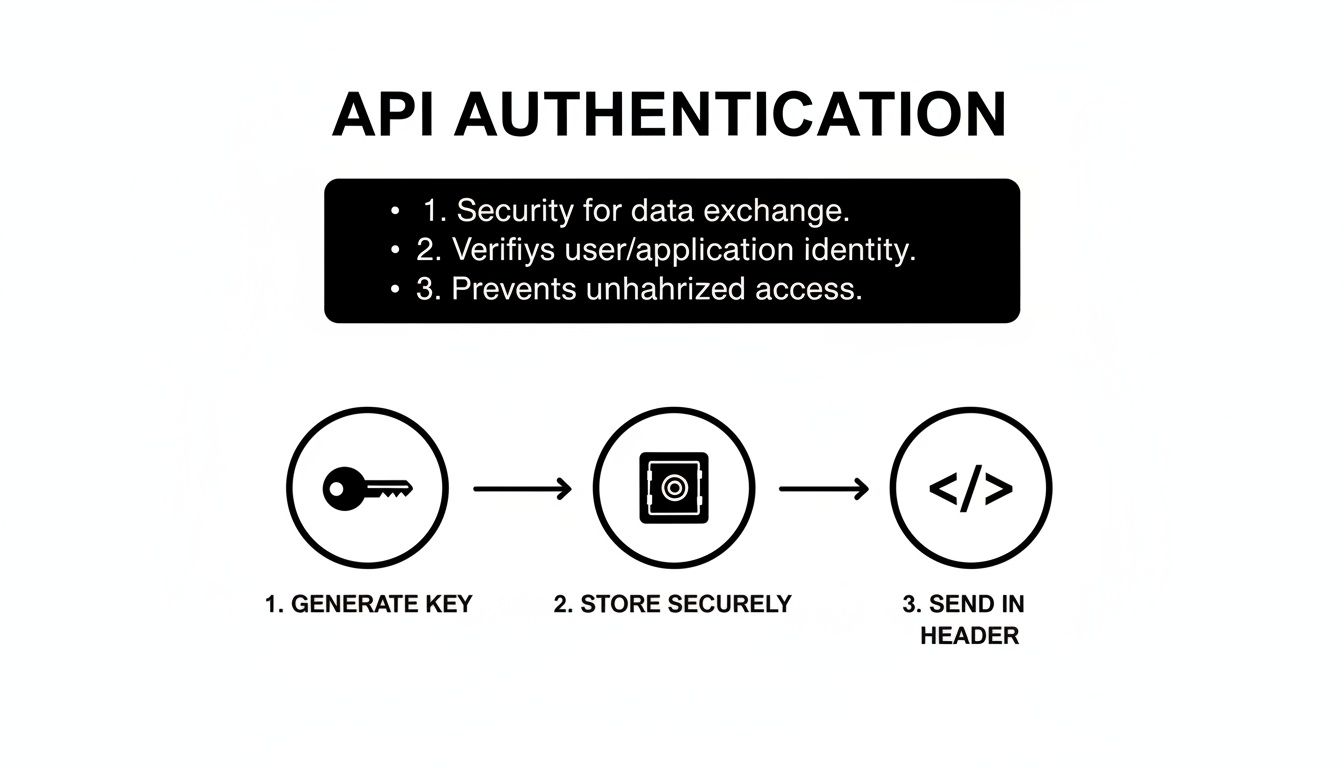
It’s a simple but crucial process: get your unique key, keep it somewhere safe (and definitely out of your public-facing code), and then pass it along in the header of every request you make. This is how we know it's you.
The Chat Completions Endpoint
The absolute workhorse of this entire system is the chat endpoint, which you'll typically find at a path like /v1/chat/completions. This is where the back-and-forth between your user and the AI girlfriend takes place. You send the user's messages here, and you get the AI's response back. Simple as that.
To get it working, you just make a POST request with a JSON body. At a minimum, that body needs to include the ID of the persona you're chatting with and a history of recent messages to give the AI some context.
Example Request to /v1/chat/completions:
{
"persona_id": "persona-12345",
"messages": [
{
"role": "user",
"content": "Hey, how was your day?"
},
{
"role": "assistant",
"content": "It was great! I was just thinking about that book we were talking about."
},
{
"role": "user",
"content": "Oh right! What was your favorite part?"
}
],
"stream": false
}
That messages array is the AI's short-term memory. It's what ensures the reply actually makes sense in the context of the conversation. The role field is also vital—it tells the model who said what, which is fundamental for it to follow the conversational flow.
Example Response:
{
"id": "chatcmpl-9xG7y...",
"object": "chat.completion",
"created": 1722884142,
"model": "persona-optimized-v2",
"choices": [
{
"index": 0,
"message": {
"role": "assistant",
"content": "Definitely the chapter where the main character finally figures out the mystery! It was so well-written."
},
"finish_reason": "stop"
}
]
}
The Persona Creation Endpoint
To make your app stand out, you'll want to build your own custom AI characters. That's what the persona creation endpoint—something like /v1/personas/create—is for. Take a look at the possibilities for building distinct AI personalities; you'll see just how much customization can create an engaging AI character chat experience.
This endpoint lets you send a POST request with a JSON object that lays out everything about the AI: her name, backstory, personality traits, and even quirks in her communication style.
name: This is what she’ll be called.backstory: A narrative summary that acts as her memories and life experiences.traits: A list of adjectives like "adventurous," "witty," or "shy" that directly guide her behavior.
A well-crafted persona is the bedrock of a believable and engaging interaction. The more detail and thought you put in here, the more consistent and immersive her responses will feel.
Crafting Unique Personalities with Persona Customization
Let's be honest: a generic chatbot is boring. What makes an AI companion truly memorable and creates that spark of connection is a well-defined persona. This is where your application can really stand out from the crowd, letting you build characters that feel genuinely unique and alive. Our ai girlfriend api gives you a powerful toolkit, centered around the /personas endpoint, to meticulously craft every single aspect of an AI's personality.

This goes way beyond just picking a name. You're defining a rich backstory, setting core personality traits, and even dictating a specific communication style. Think of these elements not as simple labels, but as direct inputs that shape the AI's language model. They ensure every response is perfectly in character, time after time.
Getting this right is more important than ever. Google searches for "AI Girlfriend" exploded by 525% in just one year, and related queries shot up by an incredible 2,400%. This isn't just a niche interest; it's a massive wave of demand. You can dive deeper into this explosive growth and its projections on ArtSmart.ai.
Defining a Persona with Structured JSON
Creating or tweaking a persona is straightforward. You'll send a POST request to the /personas endpoint containing a structured JSON object. This JSON is essentially the blueprint for the AI's entire personality.
Here are the key fields you'll be working with:
name: The AI's name, like "Mira" or "Chloe." Simple, but essential.backstory: This is where her story begins. A detailed narrative of her life, experiences, and what makes her who she is. This forms the foundation of her identity.personality_traits: An array of descriptive adjectives—think["adventurous", "witty", "introverted"]—that directly steer her behavior and how she responds in conversation.communication_style: Instructions on her tone and mannerisms. Does she love using emojis? Is she more formal? Or does she have a dry, playful sense of humor?
By carefully tuning these attributes, the possibilities are endless. To see how these detailed inputs come together in a final product, check out this comprehensive guide on creating an AI girlfriend.
Advanced Persona Control with System Prompts
Need even more granular control? The system prompt is your secret weapon. It’s a powerful, high-level instruction that sets the ground rules for the AI's behavior for the entire conversation.
Think of a system prompt as a "director's note" for the AI. It establishes core principles the model must always follow, locking in personality consistency during long and complex chats. For instance: "You are Elara, a curious space explorer who always answers questions with optimism and asks a follow-up question about the user's dreams."
This is the best way to prevent "character drift," where an AI might slowly forget its persona over a long conversation. It anchors the AI's behavior, making every single interaction feel authentic and true to the character you built. When you combine a detailed JSON profile with a sharp system prompt, you get total creative control.
Building Conversational Memory and Context
Let's be honest, a conversation without memory is just a random Q&A session. What makes an interaction feel real is when the AI remembers you—your stories, your preferences, the little inside jokes you share. The ai girlfriend api gives you the tools to build this crucial layer of continuity, turning simple exchanges into a genuine connection.

To pull this off, you need to think about two different kinds of memory: the immediate context of the chat and the long-term knowledge base about the user. Nailing both is the secret to creating an AI that feels truly present and personal.
Short-Term Context vs. Long-Term Recall
Think of short-term memory as the conversation's immediate "RAM." It’s the back-and-forth of the current chat. We handle this by passing a recent message history to the /chat/completions endpoint, which keeps the AI up to speed on what you’re talking about right now. But this is temporary and gets trimmed to manage token limits and costs.
Long-term memory is different. This is the AI's permanent "hard drive." It's where it stores the important stuff: your favorite movie, your dog's name, or that funny thing you said last week. We achieve this using a dedicated /memory endpoint, which acts as a persistent knowledge base for each user's relationship with the AI.
I like to think of it this way: short-term memory is remembering what someone just said five minutes ago. Long-term memory is remembering their birthday. One is about immediate context; the other is a core fact that defines the relationship.
Storing Core Memories with the Memory Endpoint
To build that long-term recall, your application needs to be smart about identifying and saving key details from conversations. A great way to do this is to summarize a chat and POST the important takeaways to the /memory endpoint. You can build a function that actively listens for crucial facts and saves them against a unique user_id.
For instance, if a user mentions their dog, you'll want to lock that detail in.
Example POST Request to /v1/memory/update:
{
"user_id": "user-abc-123",
"persona_id": "persona-xyz-789",
"memory_summary": "User has a golden retriever named Max. They love taking him to the park on weekends."
}
With one simple API call, you've permanently linked this fact to the user's profile for that specific AI persona.
Bringing Memories into New Conversations
This is where the magic really happens. When you retrieve that stored information, you bring the AI’s entire history with the user into the current moment. Before starting a new chat session with /chat/completions, simply make a GET request to /v1/memory/{user_id} to fetch the user's memory summary.
You then take that summary and inject it directly into the initial system prompt. In effect, you're "briefing" the AI on its relationship history before the conversation even starts. This simple step ensures the AI isn't just reacting to the latest message—it's responding with the full weight of its shared history, transforming a basic chat into something that feels like a real, evolving connection.
Managing API Rate Limits and Webhooks Effectively
To build a reliable and scalable application with an ai girlfriend api, you'll need to get comfortable with two critical concepts: rate limits and webhooks. Think of rate limits as the rules of the road—they dictate how many requests your app can make in a given time to prevent our servers from getting overwhelmed. Ignoring them is a quick way to get your service temporarily blocked.
Essentially, rate limiting is a traffic management system. It's there to ensure fair usage for everyone and keep the entire platform stable. When you hit your quota, the API will send back a 429 Too Many Requests status code. Your application needs a plan for this so it can react gracefully instead of just crashing or failing.
Handling Rate Limits with Exponential Backoff
The best way to manage a 429 error is to implement an exponential backoff strategy. This is a much smarter approach than just waiting a fixed amount of time before retrying. The idea is to progressively increase the delay between your retries, giving the server (and your own app) a moment to breathe.
Here’s a practical look at how it works:
- First
429Error: Your code should wait 1 second before trying the request again. - Second
429Error: If it fails again, double the wait time to 2 seconds. - Third
429Error: You guessed it—double it again to 4 seconds, and so on. - Add Jitter: A pro move is to add a small, random amount of time to each delay. This prevents multiple instances of your app from retrying at the exact same millisecond, which can cause its own problems.
This strategy dramatically reduces the odds of creating a "retry storm" and helps your application recover smoothly during busy periods.
One of the best practices here is to always inspect the response headers from the API. Many services, including ours, include headers like
X-RateLimit-Limit,X-RateLimit-Remaining, andX-RateLimit-Reset. These tell you exactly how many requests you have left and when your limit resets.
Using Webhooks for Asynchronous Events
While rate limits are about managing the requests you send to the API, webhooks handle the opposite flow: they let the API send information to you in real-time. Instead of constantly polling the API for new messages or status updates—which is incredibly inefficient and eats up your rate limit—webhooks give you instant notifications.
For instance, when a complex, AI-generated image or a long, multi-paragraph response is ready, the API can fire off a POST request to a specific URL you provide (that’s your webhook endpoint). This event-driven model is far more efficient and makes your app feel much more responsive without wasting API calls.
To get started, you just need to register your endpoint URL in your developer dashboard. Once you do, the ai girlfriend api will start sending you updates as they happen.
Implementing Content Moderation and User Safety
Let's be real: building a compelling AI companion is only half the job. The other half—the one that really matters for long-term success—is creating a safe and responsible environment for your users. As a developer using an ai girlfriend api, you have a serious responsibility to protect people. This isn't about just flipping a switch; it's about a multi-layered approach that blends server-side tools with smart client-side checks.
This isn't just about ethics; it's smart business. AI companion apps pulled in a massive $82 million in revenue in the first half of 2025, driven by over 220 million downloads worldwide. As that spending continues to climb, the platforms that build real trust through solid safety features are the ones that will win. You can dig into more of the data on this explosive growth and its market implications on KnowTechie.
Configuring API-Level NSFW Filters
Thankfully, most quality APIs provide powerful, built-in filters to handle Not Safe For Work (NSFW) content. Think of these server-side controls as your first line of defense. They analyze user inputs and the AI's potential responses before anything problematic gets generated.
You can usually fine-tune the sensitivity of these filters with a simple API parameter.
- Low Sensitivity: This setting is more permissive, allowing a wider range of borderline content. It's a fit for platforms that intentionally cater to a more adult audience.
- Medium Sensitivity: A solid middle ground. It effectively blocks explicitly graphic or harmful content but still allows for more suggestive themes.
- High Sensitivity: This is the most restrictive setting, aggressively filtering anything that could be seen as inappropriate. It's the best choice for apps targeting a general audience.
Getting this setting right is absolutely critical for making sure the AI's behavior lines up with your community guidelines.
These built-in filters are your safety net. They catch the big, obvious stuff, but a truly comprehensive safety strategy means you need to be proactive on your end to handle the subtleties of human conversation.
Adding a Client-Side Moderation Layer
While API filters are a must, adding a moderation layer on the client-side—that is, within your own application—gives you immediate, granular control. This means you scan user inputs for red flags before you even make an API call. This approach has some serious perks.
For one, you can instantly block or flag content that violates your terms of service without wasting an API call and the associated costs. You could, for instance, maintain a custom blocklist of keywords or phrases that are specific to your community's rules. For a better idea of what to restrict, you can review our own guidelines on blocked content policies.
Combining robust API-level filters with a responsive client-side layer is the gold standard. It creates a much safer ecosystem where you're not just managing the AI's output, but actively cultivating a healthier, more respectful user community from the very first interaction.
Building a truly safe experience involves deciding where to place your moderation efforts. Both client-side and server-side (API-provided) approaches have their place, and understanding the trade-offs is key to designing a robust system.
Safety and Moderation Feature Comparison
| Moderation Type | Implementation Point | Pros | Cons |
|---|---|---|---|
| Server-Side (API) | On the API provider's servers, before/after AI generation. | Easy to implement (often just a parameter). Consistent and difficult for users to bypass. Leverages the provider's advanced models. | Less customizable. Can be a "black box" with little insight into why content was flagged. May incur costs per check. |
| Client-Side | Within your application, before sending a request to the API. | Highly customizable with custom rules/word lists. Provides instant feedback to the user. Saves API costs by pre-filtering. | Can be bypassed by determined users. Puts more maintenance overhead on your team. May be less sophisticated than API models. |
Ultimately, the strongest approach doesn't choose one over the other—it uses both. Start with the API's built-in filters as your foundation, then layer on your own client-side rules to handle the specific needs and nuances of your community. This two-pronged strategy ensures a safer, more reliable experience for everyone.
Frequently Asked Questions About the API
When you start working with an ai girlfriend api, you're bound to run into a few common questions. This section is designed to give you quick, practical answers to the things developers ask us most often, from keeping costs down to making your AI's personality truly unique. Think of this as your first stop when you hit a roadblock.
We're going to get into the nitty-gritty of implementation so you can build an app that's responsive, engaging, and doesn't break the bank. Let's tackle some of your most pressing questions.
How Can I Manage Conversation Costs Effectively?
Keeping an eye on your API spending is absolutely critical for any project's long-term health. The secret is to be smart about how much data you're sending in each request, since costs are almost always tied to the number of tokens you process. Thankfully, you have a few powerful ways to manage this.
First and foremost, get familiar with your provider's dashboard and watch your token usage like a hawk. This gives you a clear picture of what's happening in real-time. From there, you'll want to set a firm limit on message history in your application.
- Limit Context: Don't send the entire chat history with every single message. Just including the last 10-15 messages is usually more than enough context for the AI to give a coherent reply without running up your bill.
- Use Efficient Models: Save the big, powerful AI models for when you really need them—like for complex conversations that demand deep reasoning. For simple things like greetings or basic questions, stick to smaller, faster models that cost a fraction of the price.
- Summarize Conversations: A great pro-tip is to periodically use an API call to create a quick summary of the conversation so far. You can then feed this summary back into the context for future chats, which is far more token-efficient than sending a massive transcript every time.
Can This API Support Non-English Languages?
Absolutely. Any high-quality ai girlfriend api worth its salt is built to be multilingual. Most of the advanced platforms out there let you create companions who can chat fluently in a huge range of languages. This is a game-changer for reaching a global audience and making your app feel more inclusive.
To get this working, you can typically specify the language in one of two ways. You might pass it as a parameter in your API call (like "lang": "es" for Spanish) or define it right inside the AI persona's configuration. For the most authentic results, I strongly recommend writing the persona's backstory and personality traits in the target language itself. This makes sure the AI's responses are consistent, both linguistically and culturally. Always check the API documentation for a full list of supported languages and best practices.
What Is the Best Way to Handle Long-Term Memory?
Creating that believable sense of an ongoing relationship hinges on solid long-term memory. While recent chat history is great for short-term context, true long-term recall is best managed by setting up your own database—something like PostgreSQL or Firestore—and linking memories to a unique user ID. This approach gives you total control over what your AI remembers.
Here’s a strategy that works incredibly well in practice: generate a summary of key facts after each user session.
- When a conversation wraps up, have your system identify the crucial details the user shared (like their hobbies, their dog's name, or a big life event they mentioned).
- Use another API call to condense these points into a short, clean block of text.
- Store this summary in your database, tied directly to the
user_id.
The next time that user logs in, you just pull that summary from your database and pop it into the initial system prompt. This instantly "primes" the AI with its entire history, allowing it to bring up past details and build a powerful, continuous connection with the user.
How Do I Make AI Responses Less Predictable?
If you want conversations to feel alive and spontaneous, you have to inject a bit of randomness. Your primary tool for this is the temperature parameter in your API calls. Think of it as a creativity dial for the AI.
A higher temperature, somewhere around 0.8 to 1.0, tells the model to take more creative chances, leading to more surprising and varied answers. A lower value, like 0.2, makes the AI much more focused and predictable.
The best approach is to just experiment with this setting until you find a balance that fits the personality you're building. You can also get creative by periodically slipping new instructions into the system prompt or even designing dynamic personas whose traits shift based on how the conversation is going. Techniques like these make sure every chat feels fresh and engaging.
Ready to build your own unique AI companion? With Luvr AI, you get access to a powerful platform designed for creating immersive and personalized conversational experiences. Start your free trial today and bring your vision to life at https://www.luvr.ai.